Showing posts with label Smartphone. Show all posts

Monday, March 3, 2014

Blackphone: hands-on video with the super secure smartphone

The Blackphone is a super-secure Android-enhanced smartphone presented at the MWC 2014, it protects your data and gives you a lot of security from consumer profiling.

With the NSA and other news of spying circling the internet, it's making more of us give security and the protection of our personal data a second and deeper thought. It’s with this matter in the forefront that Silent Circle came up with an innovative and clever plan to counter this rising concern: the Blackphone, one of the most interesting smartphones presented at the MWC this year. We were able to shoot a short hands-on video of the high-security smartphone.


For the price of 629 USD, pre-ordering already available, this phone is intended for those who want to ensure their data is private and secure at all times. Based on Android, Blackphone’s security focus is manifested with many pre-installed apps and an intelligent WiFi manager. 


Thanks to the PrivatOS Enhancement as opposed to your standard Android OS, search is anonymous, you are provided with safe communication tools for private calls, texts, video chat, file exchange, browsing and conference calls. Remote wipe and anti-theft components are anyonmous and each software update is secure, coming from Blackphone directly.

In the Blackphone Security Center, users are able to choose which apps get which rights and can isolate certain data types on the smartphone from being exposed to the internet, like contacts in your phone book for example. The clever WiFi manager also prohibits businesses from gaining access to user location and consumer profiles.

Check out the hands-on video below to take a closer peek:


What do you think of the Blackphone? A worthwhile investment?

Source: Blackphone

Tuesday, February 25, 2014

Share: What to do with an old smartphone?

So, you got yourself a brand new smartphone. Do you send your old one to the grave or the back or a drawer? Here's some ideas of what to do with it.

Well, it happens to everyone: time to upgrade to a new smartphone. But, if you’re like the majority of people out there, you’ve probably taken pretty good care of your current smartphone. So, what do you when it is time to upgrade? Sure, you could toss out the phone or stuff it in a drawer and let it collect dust, but why not put it to use as something else? 

     Don't throw out your smartphone quite yet!

Remote Control

There are many applications that allow you to turn your smartphone into a universal remote control. With the app Retune, for example, you can control your iTunes player, Unified Remote lets you access your PC without having to get up from your couch, and Power DVD Remote lets you control your DVD player from your smartphone.

Alarm Clock

Sure, you might already do this with your in-use phone, but if you’ve got an old smartphone around, why not set it up to a dock system and let it be a powerful alarm clock? You can definitely use the default alarm setting on your smartphone, however, give the following applications a try for a little bit more variet and “smartness” to them: Timely, Wake Up, and doubleTwist Alamar Clock.

Game Console

If your old smartphone was made in the last few years, it probably has a pretty good processor in it. Why not dedicate it as a mobile gaming console? Use it to play your favorite games, connect an external gamepad/joystick, even link it up to your television.

External storage

Want access to data at all times but don’t really trust cloud services? Turn your old smartphone into a portable hard drive and save all types of files thanks to such applications as Servers Ultimate, FTP Server, or WebDAC server.

So, those are just a few suggestions. What else do you use your smartphone for?

(originally by Nico Heister)
 

Thursday, February 20, 2014

How to sync your iTunes music library to Android smartphone or tablet?

The article will show you how to stop carrying around an mp3 player by transferring your iTunes music library to your Android smartphone or tablet. Just need four simple steps.
iTunes music library to Android
Smartphone or tablets are essentially portable music players so here is how to transfer your iTunes library to an Android phone or tablet.

So you've got a new Android smartphone or tablet and want to listen to your amazing music collection on it, but how on earth do you get your library from your computer to your Android device?

See also: How to Extend Rental Time of iTunes Movie Rental?

Luckily the process is fairly simple because Android devices appear on computers as storage volumes. You'll need a microUSB to regular USB cable for this which is normally supplied with any new device.

How to transfer iTunes music library to Android phone?

Step 1. Plug your Android phone (or tablet) into your PC. You may need to tell the phone to operate in MTP mode for transferring files.


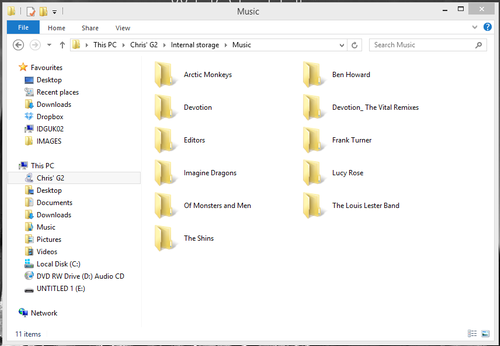
Step 2. Open a new File Explorer window and navigate to your device's music folder. In this case the location is: This PC > Chris' G2 > Internal Storage > Music.


Leave this window open ready to move your music.

Step 3. Open a new File Explorer window (right click on 'This PC' and select 'open in a new window') and find your iTunes music library. By default this is found in: This PC > Music > iTunes > iTunes Media > Music.


Step 4. With the two windows open next to each other on your desktop simply drag and drop the music you want to transfer to your Android device. You can select particular folders or just move everything if you have enough free storage space on your device.


Editor's Recommendation: